Documentation IndexFetch the complete documentation index at: /llms.txtUse this file to discover all available pages before exploring further.
Fetch the complete documentation index at: /llms.txt
Use this file to discover all available pages before exploring further.
Install PHP APM agent in Vapor PHP apps with the below installation steps and detect php errors to find out the performance bottlenecks in your PHP app.
FROM laravelphp/vapor:php80

RUN wget https://s3.amazonaws.com/atatus-artifacts/atatus-php/downloads/atatus-php-1.18.0-x64-musl.tar.gz && \
    tar -zxvf atatus-php-1.18.0-x64-musl.tar.gz && \
    cd atatus-php-1.18.0-x64-musl && \
    ATATUS_LICENSE_KEY="<YOUR_LICENSE_KEY>" ATATUS_APP_NAME="<YOUR_APP_NAME>" \
    ATATUS_RELEASE_STAGE="production" /bin/sh install.sh && \
    sh -c "sed -i -e 's/atatus\.guzzle\.enable_extension = .*/atatus\.guzzle\.enable_extension = true/' /usr/local/etc/php/conf.d/atatus.ini" && \
    sh -c "sed -i -e 's/atatus\.framework = .*/atatus\.framework\ = \"Laravel\"/' /usr/local/etc/php/conf.d/atatus.ini" && \
    sh -c "sed -i -e 's/atatus\.predis\.enable_extension = .*/atatus\.predis\.enable_extension = true/' /usr/local/etc/php/conf.d/atatus.ini" && \
    sh -c "sed -i -e 's/atatus\.collector\.log_file = .*/atatus\.collector\.log_file = \"\/tmp\/collector.log\"/' /usr/local/etc/php/conf.d/atatus.ini" && \
    sh -c "sed -i -e 's/atatus\.agent\.log_file = .*/atatus\.agent\.log_file = \"\/tmp\/agent.log\"/' /usr/local/etc/php/conf.d/atatus.ini"

COPY . /var/task
atatus.ini
atatus.collector.notify_host = "YOUR_ON_PREMISE_HOST"
atatus.collector.notify_ssl = YOUR_ON_PREMISE_SSL
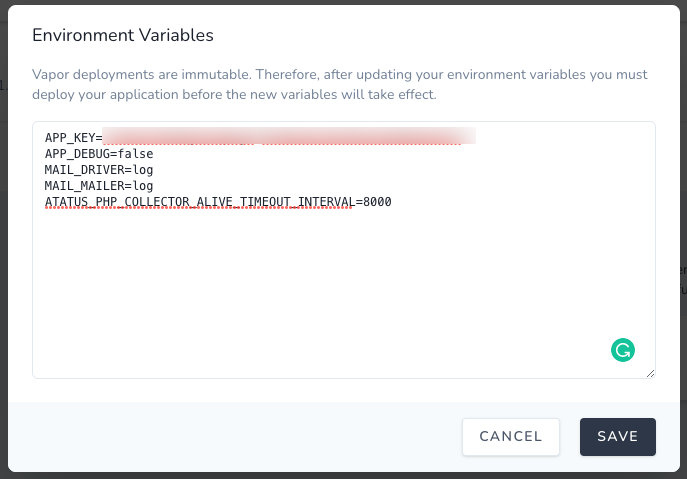
ATATUS_PHP_COLLECTOR_ALIVE_TIMEOUT_INTERVAL
ATATUS_PHP_COLLECTOR_ALIVE_TIMEOUT_INTERVAL=8000
php vendor/bin/vapor deploy