

Serverless Framework
-
Install
serverlesspackage -
Navigate to Atatus Dashboard —> Settings —> Account Settings —> API Keys. You can generate a new API key (select - Ingest License Key). After obtaining the API key, you’ll need to set it in the
serverless.yamlfile under the environmentATATUS_LICENSE_KEY(see step 3). -
Add Lambda layers to your
serverlessprovider configuration
Layers Syntax:
arn:aws:lambda:<region>:317265140635:layer:Atatus-NodeJS:<version>AWS_LAMBDA_EXEC_WRAPPER is an environment variable used in AWS Lambda functions to specify a custom wrapper script that runs before the main handler function. This allows you to customize the execution environment, perform initialization tasks, or manage the invocation of the actual handler.SAM Template
- Install AWS SAM CLI
-
Navigate to Atatus Dashboard —> Settings —> Account Settings —> API Keys. You can generate a new API key (type - Ingest License Key). After obtaining the API key, you’ll need to set it in the
serverless.yamlfile under the environmentATATUS_LICENSE_KEY(see step 3). -
Add Lambda layers to your
SAMprovider configuration
Layers Syntax:
arn:aws:lambda:<region>:317265140635:layer:Atatus-NodeJS:<version>AWS_LAMBDA_EXEC_WRAPPER is an environment variable used in AWS Lambda functions to specify a custom wrapper script that runs before the main handler function. This allows you to customize the execution environment, perform initialization tasks, or manage the invocation of the actual handler.AWS Console
1. Add Atatus Layer to Your Lambda Function:
- Navigate to the AWS Management Console.
- In the search bar at the top, type
Lambdaand select the Lambda service from the drop down. - Select the function you want to modify.
- In the Function overview section, click on
Layers. - Once you are in the Layers section, click on the
Add a layerbutton. - Select “Specify an ARN” as Layer source and enter the following ARN
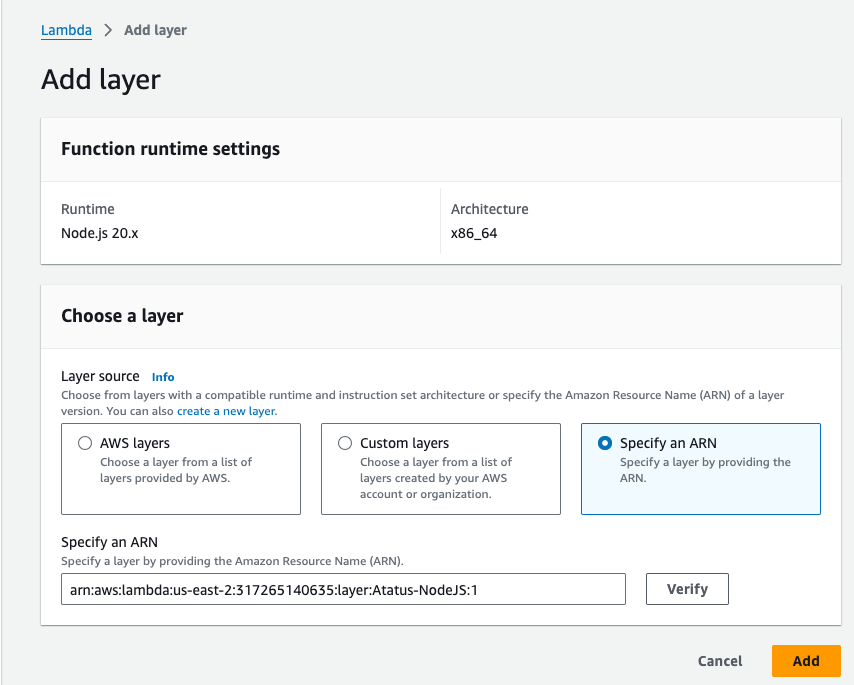
- After entering the ARN, click the Add button to associate the specified layer with your Lambda function.
2. Configure Agent Environment Variables:
- Still in your Lambda function configuration page, scroll down to the
Configurationtab. - Within the Configuration tab, Click on
Environment variables. - To set the agent environment variables, click the
Editbutton. - You can now set following environment variables
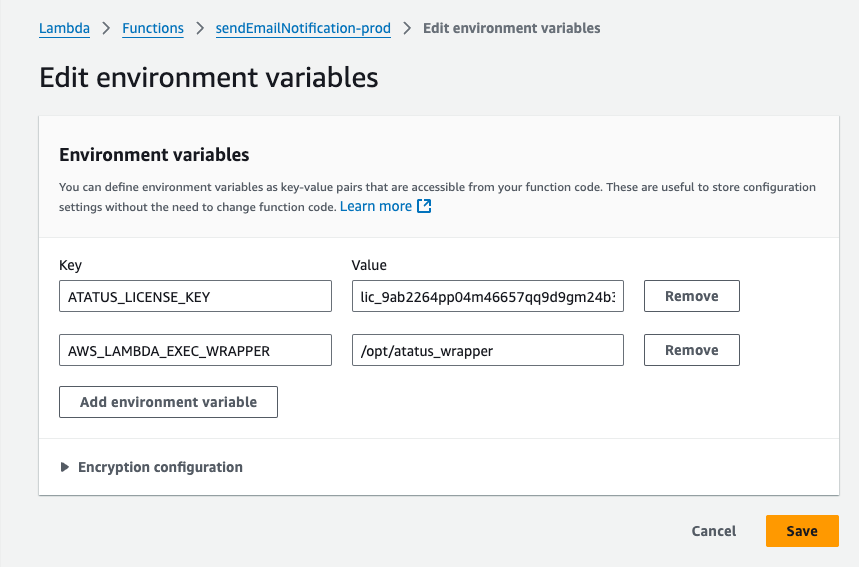
- Once you have added all necessary environment variables, click the Save button.