- Atatus Account Id: Make a note of this value.
-
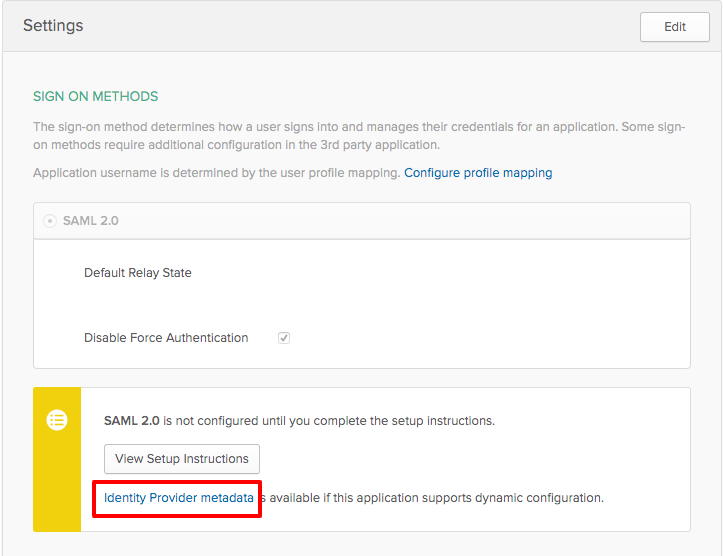
Paste Identity Provider metadata link into the SAML metadata URL from your SSO provider text box.
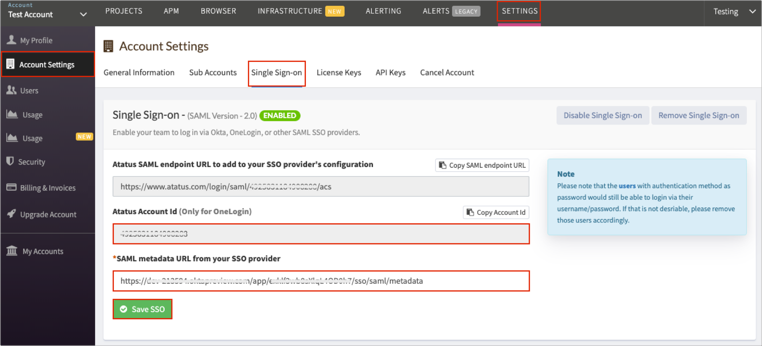
- Click on the Save SSO button.
- Login to Okta and click on the Applications drop-down menu and click on the Applications option.
- Click on the Add Application button.
- Search for the Atatus application and click on the add button of Atatus app.
-
Navigate to Sign On tab for the Atatus app and then click Edit.
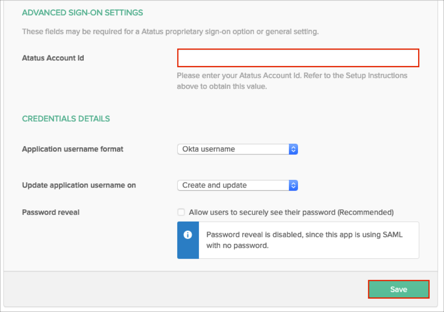
- Scroll down to the ADVANCED SIGN-ON SETTINGS section.
- Enter the Atatus Account Id value you made a copy from Atatus SSO settings.
- Click Save
-
Right click on the Identity Provider metadata link and copy the link and paste into to Atatus SSO settings.