

Integrate Pivotal Tracker with Atatus
PivotalTracker is a collaborative project management tool from the agile experts at Pivotal Labs.Setup
-
Go to project Settings » Ticketing Integrations » PivotalTracker in Atatus.
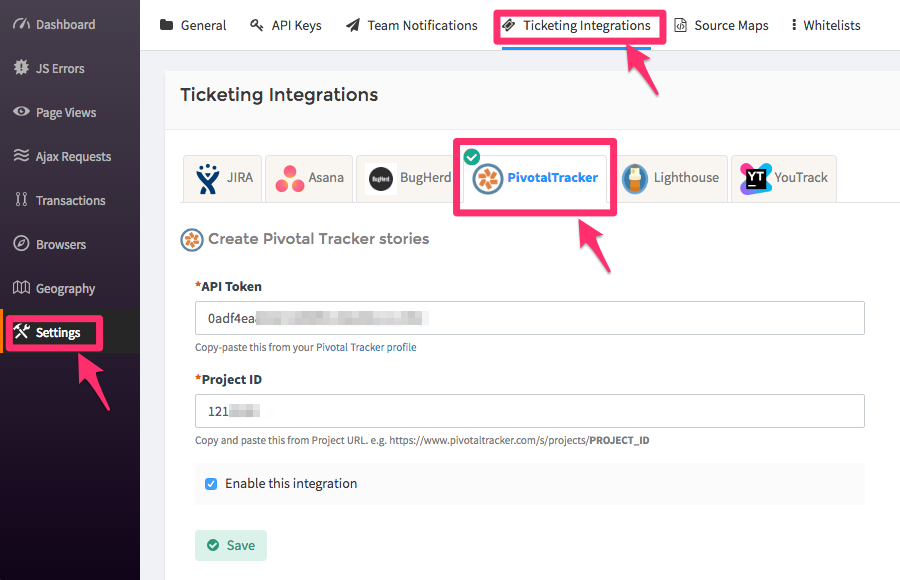
- Copy-paste the API Token from your Pivotal Tracker profile.
-
From your project URL, copy the last set of digits from the URL and paste it into the project Id text box. Example,
https://www.pivotaltracker.com/s/projects/1210528where1210528is the one that has to be pasted here. - Click on the Save button when you’re done.
How to Use
-
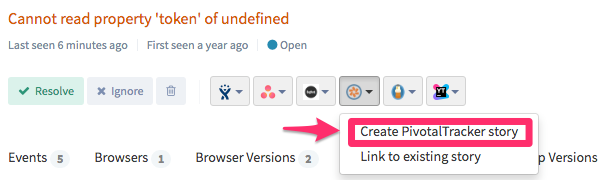
After you set up the integration, you’ll notice a PivotalTracker button below the error message in the Error page. This will allow you to create a new story for the error, or link with an existing one.
-
Once the story is created or linked, you will see the link in the drop down menu. To jump to the story in PivotalTracker simply click the link created.